Part 1 shows how to choose a frame on the Box Frames page. Parts 2 and 3 show how to set it up on the frame's own page, using the 29mm White Box Frame as the example.
Example: a 400 × 300mm backing board with a 48mm spacer. Recorded 18 October 2026.
Part 1: Choosing a box frame
What a box frame is for, how to enter your size, choosing by colour and by box spacer depth, and the links under every frame.
Video, part 1 of 3: choosing a box frame.
What a box frame is for
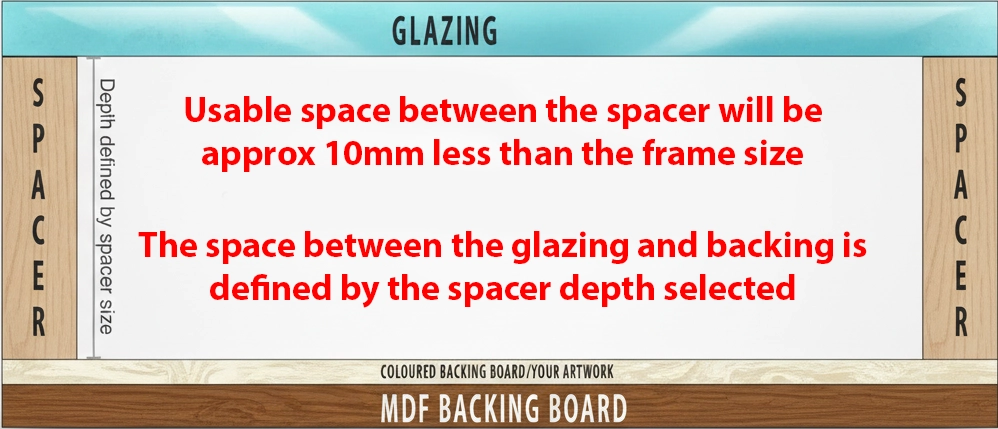
A box frame is a deep frame for things that aren't flat: medals, shirts, keepsakes, baby shoes, and anything too deep for an ordinary picture frame. The drawing at the top of the page, Anatomy of a box frame , shows how it works:
A spacer runs round the inside of the frame, between the glazing and the backing board .
It holds the glazing away from the backing board, leaving depth for your item in between.
The backing board is held in at the back with flexible tabs .
The anatomy of a box frame.
Enter your size
Enter the size of the backing board : the area you want inside the frame. Here, 400 × 300mm . You can also use inches or a popular size. Every price includes clear acrylic glazing, the spacer shown, an MDF backing board and hanging fixtures. The usable area between the spacers is about 10mm smaller than the size you enter, so allow for that.
Size entered, with the note about what's included.
Choose by colour
Click a Colour to see only frames in that colour: White shows 9 frame profiles in 11 colours. Click it again to see every colour.
White box frames.
Choose by box spacer depth
Spacers come in five depths: 6, 12, 19, 25 and 48mm . Choose the depth your item needs, then click it under Box spacer depth to see only the frames deep enough to take that spacer. Each frame shows the spacer it comes with.
25mm : 5 frame profiles.48mm , for deep items: only 1, the 29mm stained deep frame.
25mm: 5 frames.
48mm: 1 frame.
View profile, order a sample and compare
Under every frame are three links: Compare , Order sample and View profile .
View profile opens a drawing of the frame's cross-section with its measurements.Order sample adds a short length of the moulding to your basket, so you can see the colour and finish first.Compare : tick it under up to four frames, then click Compare in the bar at the bottom of the screen. They're shown side by side, with total depth, spacer, material and finish.
The links under every frame.
View profile.
Order sample.
Compare.
Frames ticked to compare.
Open your frame's page
Click a frame's picture to open its page. Your size goes with you. In the video we filter to 48mm again and open the 29mm White Box Frame.
Open the frame's page.
Part 2: Size, box spacer and views
Check your size, choose a box spacer and see how the drawing changes, and look at the frame in the corner, profile and 3D views.
Video, part 2 of 3: size, box spacer and views.
Check your size
The backing board size carries over from the list: 400 × 300mm. Just below it is the frame's rebate depth: “Rebate depth: 67mm (2 5/8"). The glazing, the spacer, your item and the backing board all sit inside this depth.”
Size and rebate depth.
Choose your box spacer
Open Box spacer . This frame takes 19mm , 25mm or 48mm spacers, each in black, white or natural; the colour shows at the sides of your item. The drawing beside them shows a cross-section of the frame with the spacer you've chosen, and redraws when you change it:
48mm : 48mm for your item, with about 14mm spare in the rebate (£75.11 at this size).25mm : 25mm for your item, about 37mm spare (£73.24).19mm : 19mm for your item, about 43mm spare (£71.36).
Choose a spacer a little deeper than your item, so the glass doesn't press on it.
48mm spacer.
25mm spacer.
19mm spacer.
Corner, profile and 3D
Corner : a close-up of the moulding.Profile : the frame's cross-section: 29mm wide and 73mm deep, with a 67mm rebate.3D and AR : a model of your box frame, built with the spacer you've chosen. In the video it turns right round to the back, where you see the MDF backing board held in with flexible tabs, then back to the front at an angle, where you can see the spacer inside the frame.
Corner.
Profile.
3D, from the back.
Changing the spacer changes the model. With the 48mm spacer the glass sits well forward, and you can see a deep band of spacer inside the frame. With 19mm the glass sits much closer to the backing board: less room for your item, and a shallower look.
48mm spacer.
19mm spacer.
Part 3: Mount, glazing, backing and review
Add a mount, choose glazing, a backing colour and extras, check the specification, save or email your design, and add it to your basket.
Video, part 3 of 3: mount, glazing, backing and review.
Mount
Open Mount and choose No mount , Single mount or Double mount . In a box frame the mount sits at the back, on the backing board, around your item. It works as in our other guides:
A Border width for all four sides, or untick Equal borders to set each side.
Exact size cuts the opening to exactly your size, with no overlap.The box under the widths shows the opening and the outside size .
More options adds aperture shapes, corners and a title box.A colour for each layer: here, Off White on top and Slate Grey underneath.
Single mount.
Double mount.
More options.
Off White over Slate Grey.
Glazing
2mm Clear Acrylic Glazing is included and selected to start with. You can upgrade to 3mm UV100 Gallery Plexiglas Clear acrylic (+£13.10 here) or 3mm ArtGlass Lifetime Museum Acrylic . In the video we go back to the standard clear acrylic.
Glazing options.
Backing colour
Backing colour covers the MDF backing board with a coloured board, as a background for your item. None is selected to start with. Here, Black .
A black backing.
Recommended extras suggests useful items, with more under More extras and in Useful extras for box frames lower down. Click Add to include one: here, a roll of 9mm double-sided foam tape (£3.00), handy for fixing items to the backing board.
Tape added.
Check the specification
Scroll down to What's included (the frame made to your size, the glazing and spacer you've chosen, the MDF backing board and hanging fixtures) and the Specification . In this example:
Frame style 411000127BOX · 29mm White Box Frame Frame size 490 × 390mm To take image size 400 × 300mm Top mount 8065 · Off White, borders 40mm all round Bottom mount 8159 · Slate Grey, 5mm Spacer CEN0548WH · 48mm White Glazing 2mm Clear Acrylic Glazing Backing colour 8011 · Black Accessory 9mm Double Sided Extra Strong Foam Mounting Tape × 10m Face width / rebate / total depth 29mm / 67mm / 73mm
What's included and the specification.
Save, email and add to basket
Save design adds it to your Design Gallery .Email design sends it to someone else: enter their email address, edit the message, type the verification word and click Submit .Add to basket : “Your £117.10 Custom Box Display Frame has been added to your basket. Frame size: 400 X 300mm (this is the size of the board in the back of the frame). Glazing to Backing space: 48mm.”
The email form was opened in this demo but nothing was sent.
Save design.
Email design.
Added to basket. (The basket also holds the moulding sample from Part 1.)
Screenshots taken from the live site on 18 October 2026. The orange outlines and labels were added for this guide and aren't part of the site. The demo stopped at the basket, and no order or email was sent. Prices may change.